We now support Splashtop SOS as well as LogMeIn Rescue.
Click either the Splashtop SOS or LogMeIn logo continue:
Available Lync Meetings are displayed below:
Refresh Meetings
Please download Splashtop SOS program, run it, and share the 9 digit pin code with your support representative.
Download SplashtopSOS
Please complete the following form to start your LogMeIn Rescue Remote Support Session with Burconix Ltd.
Your Browser is blocking Javascript for this page.
If trying to connect from a server please ensure IESEC is switched off for Administrators,
or add the following URLs to your Trusted sites and refresh this page:
http://www.burconix.com
https://secure.logmeinrescue.com
https://portal.burconix.com
https://meet.lync.com
Alternatively please click here to download the Logmein Rescue Applet manually.
When prompted please click run/open on the Logmein Rescue Applet at the bottom of this page.
Alternatively, if you are prompted to first Save, you will then need to click to run the connection file once it has downloaded:

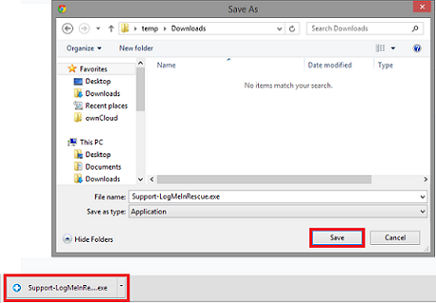
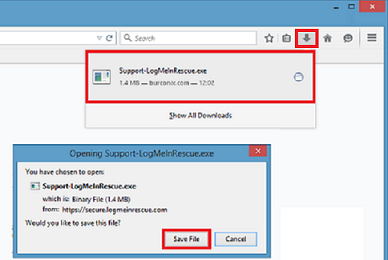
If unable to connect, please click here to download the Logmein Rescue Applet manually, and then double click to run.